
Amazon Fire Stick: Is It Worth Buying in 2026?

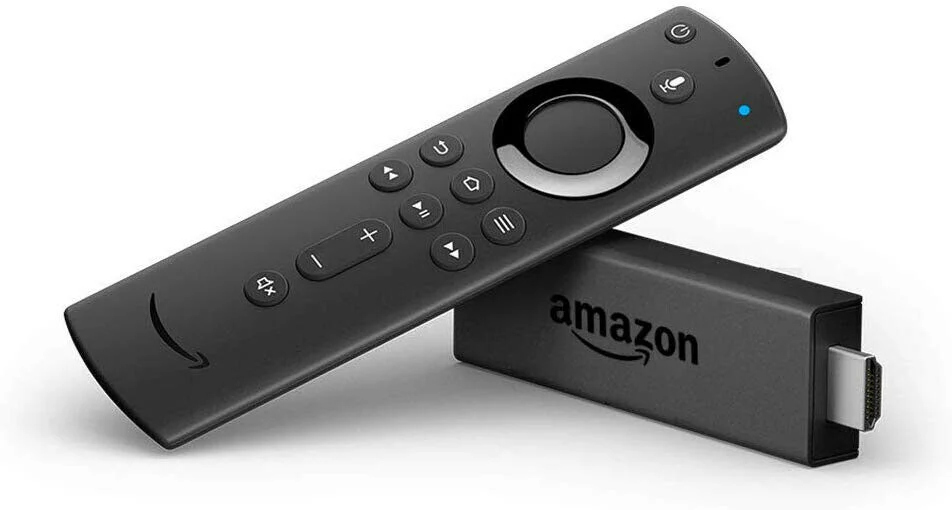
Amazon Fire Stick: Is It Worth Buying in 2026?
Streaming has quietly taken over our living rooms. One day you’re flipping through cable channels, and the next, you’re choosing between Netflix, Prime Video, YouTube, and dozens of other apps. In the middle of this shift, one small device keeps showing up everywhere: the Amazon Fire Stick.
But here we are in 2026. Smart TVs are smarter, apps are everywhere, and competition is fierce. So the real question is simple and honest: is the Amazon Fire Stick still worth buying in 2026, or has it been left behind?
I’ve spent time using it, setting it up on different TVs, testing it with real households, slow internet connections, and everyday streaming habits. This article isn’t hype-driven. It’s written to help you decide, clearly and confidently, whether the Amazon Fire Stick deserves a spot behind your TV this year.
What Is the Amazon Fire Stick?
The Amazon Fire Stick is a compact streaming device that plugs into your TV’s HDMI port. Once connected to Wi-Fi, it turns almost any television into a smart TV. You can stream movies, TV shows, live TV, music, and even play simple games.
At its core, the Amazon Fire Stick runs on Fire OS, Amazon’s customized operating system based on Android. It’s tightly integrated with Amazon services, but it also supports most major third-party streaming apps.
Popular Amazon Fire Stick Models in 2026
Amazon usually refreshes its lineup, but the most common options you’ll see include:
- Fire TV Stick Lite
- Fire TV Stick (Standard HD)
- Fire TV Stick 4K
- Fire TV Stick 4K Max
Each model targets a different user, depending on budget, resolution needs, and performance expectations.
Why the Amazon Fire Stick Still Matters in 2026
With so many smart TVs available, you might wonder why anyone still buys a streaming stick. The answer lies in flexibility and control.
Many built-in TV systems slow down over time. Updates become rare. Apps crash or disappear. The Amazon Fire Stick avoids those problems by acting as a separate, regularly updated streaming hub.
Moreover, the Amazon Fire Stick remains one of the most affordable ways to access premium streaming without replacing your entire TV.
Setup Experience: Simple and Beginner-Friendly
One of the biggest strengths of the Amazon Fire Stick is how easy it is to set up. You plug it in, connect it to Wi-Fi, sign in with your Amazon account, and you’re ready to stream.
Even users who aren’t tech-savvy usually complete the setup within minutes. The on-screen instructions are clear, and the remote pairing process is smooth.
What You Need to Get Started
- A TV with an HDMI port
- A stable internet connection
- An Amazon account
- Basic streaming subscriptions (optional)
No extra cables. No complicated configurations. That simplicity still holds strong in 2026.
Performance and Speed: Does It Feel Fast Enough?
Performance is where older streaming devices often fail. Fortunately, newer Amazon Fire Stick models have improved significantly.
In everyday use, menus load quickly, apps open without long delays, and switching between services feels smooth. The 4K and 4K Max versions handle multitasking better, thanks to improved processors and more RAM.
However, performance still depends on your internet speed and how many apps you keep installed. Clearing unused apps and restarting occasionally helps maintain smooth operation.
Streaming Quality
The Amazon Fire Stick supports:
- Full HD streaming
- 4K Ultra HD
- HDR10 and HDR10+
- Dolby Vision (on supported models)
- Dolby Atmos audio
When paired with a capable TV and sound system, the viewing experience is genuinely impressive.
App Support and Content Availability
This is where the Amazon Fire Stick really shines. In 2026, it supports almost every major streaming platform users care about.
Popular Streaming Apps Available
- Netflix
- Amazon Prime Video
- Disney+
- YouTube
- Hulu
- HBO Max
- Apple TV
- Spotify
- Twitch
You also get access to live TV apps, news channels, sports streaming services, and international content.
In addition, the Amazon Fire Stick allows app sideloading, which advanced users appreciate. While not everyone uses this feature, it adds flexibility that many competitors restrict.
Voice Control and Alexa Integration
The Alexa voice remote is more than a gimmick. In real-world use, it saves time.
You can search for movies, open apps, control playback, adjust volume, and even control smart home devices using voice commands. Saying what you want instead of typing with a remote feels natural, especially during casual viewing.
In 2026, Alexa integration is smarter, more accurate, and faster than earlier versions.
User Interface: Love It or Hate It?
The Fire TV interface is content-heavy. Amazon promotes its own services prominently, especially Prime Video. Some users love the recommendations. Others find them overwhelming.
That said, customization options have improved. You can reorder apps, remove unused ones, and personalize content rows to some extent.
Once you get used to it, navigation becomes second nature.
Amazon Fire Stick vs Smart TV Built-In Apps
This comparison matters more than ever.
Advantages of Amazon Fire Stick
- Faster updates than most TV brands
- Portable and easy to move between TVs
- Consistent interface across devices
- Broader app compatibility
- Affordable upgrade path
Where Smart TVs Compete
- No extra device required
- Fewer cables
- Often optimized for the TV brand
If your TV’s built-in system feels slow or outdated, the Amazon Fire Stick is an easy fix.
Gaming and Extra Features
The Amazon Fire Stick isn’t a gaming console, but it supports casual games and cloud gaming services. Bluetooth controller support adds flexibility.
Other useful features include:
- Screen mirroring
- Bluetooth headphone support
- Parental controls
- User profiles
- Data monitoring
These extras add real value, especially for families.
Pros and Cons of the Amazon Fire Stick in 2026
Pros
- Affordable pricing
- Wide app support
- Excellent 4K streaming
- Voice control with Alexa
- Regular software updates
- Portable design
Cons
- Ads and promotions on the home screen
- Limited internal storage
- Best features tied to Amazon ecosystem
- Performance varies by model
No device is perfect, but the strengths outweigh the weaknesses for most users.
Who Should Buy the Amazon Fire Stick in 2026?
The Amazon Fire Stick is a smart choice if:
- You own a non-smart or older smart TV
- You want an affordable streaming upgrade
- You already use Amazon services
- You prefer voice search
- You want portability
It may not be ideal if you dislike ads or want a completely neutral interface.
Is the Amazon Fire Stick Worth Buying in 2026?
After considering performance, price, content, and usability, the answer is yes, for most people.
The Amazon Fire Stick continues to deliver reliable streaming, broad app support, and excellent value. While competition exists, few devices match its balance of affordability and features.
It doesn’t try to be flashy. It simply works. And sometimes, that’s exactly what people want.
Buying Tips Before You Decide
Before purchasing, think about:
- Your TV’s resolution
- Your internet speed
- Whether you want Dolby Vision or Atmos
- How heavily you use Amazon services
Choosing the right model makes a big difference in satisfaction.
Final Verdict
The Amazon Fire Stick has aged well. In 2026, it remains a practical, user-friendly, and cost-effective streaming solution. Whether you’re upgrading an old TV or enhancing a newer one, it delivers consistent performance without demanding a big investment.
If you’ve used one before, share your experience. If you’re considering buying one, ask questions. Streaming is personal, and the best choice is the one that fits your habits best.